Corsair Warthog PC Build: Ryzen 9 9950X3D + RTX 5080
Description
Introduction
After five to six years of running Intel NUC small form factor systems, this build is the jump to a full mid-tower. The previous machine was a NUC 13 Extreme running a Core i9-14900K, an RTX 5080, and 96GB of DDR5, which is about as far as a compact enthusiast box can be pushed. The new home is Corsair's WARTHOG, with an AMD Ryzen 9 9950X3D at the center.
Moving from a small form factor case to a mid-tower trades desk space for cooling headroom, quieter fans at the same temperatures, room for more storage, and far easier upgrades. Everything below is the exact part list, with current prices where we can check them.
The case: Corsair WARTHOG RS
The WARTHOG is a steel mid-tower with a rugged, military-inspired frame, top carry handles, and protective guards around the front I/O. The RS version ships with two RS200 200mm intake fans in the front and an RS120 exhaust. It supports up to thirteen 120mm fans and dual 360mm radiators, reverse-connector motherboards, and includes a GPU anti-sag arm and Corsair's RapidRoute 2.0 cable tray. In this build the front RS200 fans stay for now, with a planned swap to Noctua NF-A20 200mm fans.
CPU and cooling
The AMD Ryzen 9 9950X3D brings 16 cores and 32 threads with AMD's second-generation 3D V-Cache, boosting up to 5.7 GHz. It is the rare chip that is both a top gaming processor and a serious workstation CPU, which suits a machine used for everything.
Cooling is a TRYX HOLO 360mm AIO with an Asetek Gen 7 V2 pump and a holographic display on the pump head, rated for 280W, well above the 9950X3D's 170W. The stock FOBR RGB fans were swapped for three Noctua NF-A12x25 G2 fans for quieter, more consistent airflow, and four more NF-A12x25 G2s handle the rest of the case.
Motherboard
The ASUS ROG Crosshair 2006 X870E is the 20th anniversary edition of ROG's flagship AM5 board, with 20+2+2 power stages, a 2-inch OLED display, five M.2 slots, PCIe 5.0, two USB4 ports, and Wi-Fi 7. The five M.2 slots are what make the four-drive storage setup possible without add-in cards.
Memory
64GB of TEAMGROUP T-Create Expert DDR5-6000 CL30 in a 2 x 32GB kit. DDR5-6000 with CL30 timings is the well-known sweet spot for Ryzen 7000 and 9000 processors, and two 32GB sticks keep the memory in dual channel with headroom for heavy multitasking and creative work. See our guide to how much RAM you need.
Storage
Three WD_BLACK SN850X 2TB PCIe Gen4 NVMe drives give 6TB of fast storage with reads up to 7,300 MB/s, and a separate TEAMGROUP 512GB NVMe drive holds a Linux install, so the system dual boots without the two operating systems sharing a drive.
Video card
The NVIDIA GeForce RTX 5080 Founders Edition carries over its role from the NUC: 16GB of GDDR7, 10,752 CUDA cores, and a compact two-slot, 304mm design that is easy to fit in the WARTHOG. Founders Edition cards are sold through NVIDIA, so that row links to NVIDIA's product page. Compare partner cards on our video card deals page.
Power supply
A Corsair SF1000 1000W, 80 PLUS Platinum, fully modular SFX unit powers everything. It is small for an ATX case, but the included SFX-to-ATX bracket mounts it in the standard bay and frees up space for cables. With the CPU and GPU together the system peaks around 605W, so 1000W is comfortably above the 850W we would recommend.
Planned upgrades
The two stock 200mm Corsair fans in the front are next on the list, to be replaced with Noctua NF-A20 PWM 200mm fans to match the rest of the Noctua setup.
Part List
| Component | Selection | Qty | Promo | Availability | Price | Buy |
|---|---|---|---|---|---|---|
| CPU |  AMD Ryzen 9 9950X3D
| 1 | — | In stock | $691.99 | Buy |
| CPU Cooler |  TRYX HOLO 360mm AIO Liquid Cooler
| 1 | — | In stock | $179.99 | Buy |
| Motherboard |  ASUS ROG Crosshair 2006 X870E (20th Anniversary)
| 1 | — | In stock | $939.20 | Buy |
| Memory | TEAMGROUP T-Create Expert DDR5 64GB (2 x 32GB) 6000MHz CL30
| 1 | — | Search | — | Buy |
| Storage | WD_BLACK SN850X 2TB NVMe SSD
| 3 | — | Search | — | Buy |
| Storage | TEAMGROUP 512GB NVMe SSD (Linux drive)
| 1 | — | Search | — | Buy |
| Video Card | NVIDIA GeForce RTX 5080 Founders Edition
| 1 | — | At maker | — | View |
| Case | Corsair WARTHOG RS Airflow Mid-Tower Case (Black)
| 1 | — | At maker | — | View |
| Power Supply | Corsair SF1000 (2024) 1000W SFX
| 1 | — | Search | — | Buy |
| Case Fans |  Noctua NF-A12x25 G2 PWM 120mm
| 7 | — | In stock | $244.65$34.95 each | Buy |
| Total for parts with a current price | $2,055.83 | Buy all | ||||
Not included in the total: TEAMGROUP T-Create Expert DDR5 64GB (2 x 32GB) 6000MHz CL30, WD_BLACK SN850X 2TB NVMe SSD, TEAMGROUP 512GB NVMe SSD (Linux drive), NVIDIA GeForce RTX 5080 Founders Edition, Corsair WARTHOG RS Airflow Mid-Tower Case (Black), Corsair SF1000 (2024) 1000W SFX. These link to the maker's page or a product search.
Planned upgrades
| Case Fans | 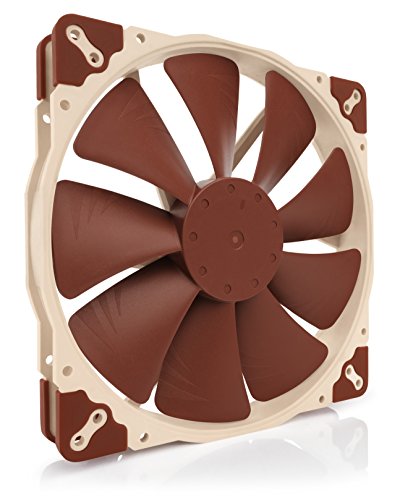 Noctua NF-A20 PWM 200mm
| 2 | — | In stock | $71.90$35.95 each | Buy |
|---|
Prices include promotional discounts where available and can change after they were checked. We may earn a commission when you buy through these links, at no extra cost to you.
Corsair Warthog build FAQ
Does an RTX 5080 Founders Edition fit in the Corsair Warthog?
Yes, with plenty of room. The RTX 5080 Founders Edition is a two-slot card about 304mm long, and Corsair lists GPU clearance of around 400mm or more in the Warthog depending on the front fan setup.
Can you use an SFX power supply in an ATX case like the Warthog?
Yes. The Corsair SF1000 includes an SFX-to-ATX bracket, so it mounts in a standard ATX power supply bay. It also leaves extra room for cable management at the bottom of the case.
Is 1000W enough for a Ryzen 9 9950X3D and RTX 5080?
Yes. The processor is rated at 170W and the RTX 5080 at 360W, so the whole system peaks at roughly 605W. A 1000W unit leaves generous headroom and keeps the fan quiet under load.
Is a 360mm AIO enough for the Ryzen 9 9950X3D?
Yes. The TRYX HOLO 360 is rated for 280W of heat, well above the 9950X3D's 170W rating. Swapping in Noctua NF-A12x25 G2 fans keeps it quiet at the same cooling performance.
Why use three separate NVMe drives?
Splitting storage across drives keeps the operating system, game library, and projects separate, and each WD_BLACK SN850X runs at full PCIe Gen4 speed in its own M.2 slot. A fourth small drive holds a separate Linux install for dual booting.