Budget Home Office PC Build [$538]
Description
Introduction
A low-cost desktop for work and school: a processor with built-in graphics, 16GB of memory, and a solid state drive, with no separate video card. It is built for office apps, web browsing, video calls, streaming video, and light photo editing.
Every part was picked from current listings for the best combination of price and compatibility, and the whole list comes to $537.91, $50.00 below the parts' reference prices. Prices were checked when this page was last updated and can change, so the total updates with every refresh.
CPU
The Intel Core i5-14400 desktop processor is a 10-core processor on the LGA1700 socket with integrated graphics. Its built-in graphics drive one or more monitors without a separate video card, which keeps the cost, power draw, and noise down.
This CPU includes a cooler in the box, which is plenty for office and everyday work, so no separate cooler is needed.
Motherboard
The ASRock H610M-HDV/M.2 R2.0 Micro-ATX Motherboard is a Micro-ATX board with the H610 chipset that matches the CPU's LGA1700 socket and takes DDR4 memory. It is the lowest-cost compatible board in our current listings, which leaves more of the budget for the parts that affect everyday speed.
Memory
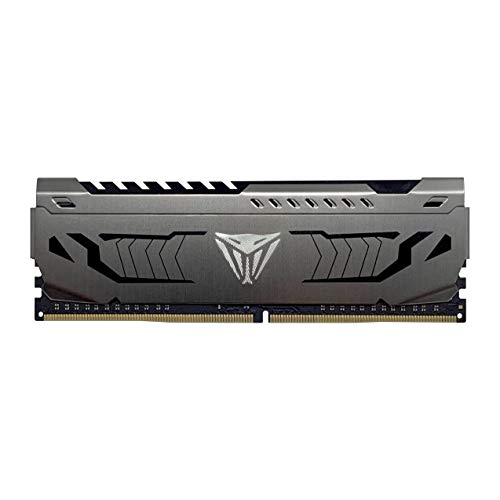
16GB of DDR4 at 3200 MT/s (Patriot Viper Steel DDR4 RAM 16GB (1X16GB) 3200MHz CL16 Desktop Memory). 16GB handles office apps, dozens of browser tabs, and video calls comfortably. See our guide to how much RAM you need.
Storage
The Patriot P210 512GB Internal SSD is a 512GB SATA SSD. A solid state drive makes the PC boot, open apps, and open files far faster than a hard drive. 512GB or more holds Windows, your apps, and years of documents.
Graphics
This build has no separate video card. The processor's integrated graphics handle office work, web video, and multiple monitors. If you want to game later, add a video card and check the power supply rating first.
Case
The ASUS A31 ATX Mid-Tower PC Case fits ATX, Micro-ATX, Mini-ITX boards, so it holds this Micro-ATX motherboard with room to spare.
Power Supply
We estimate this build draws about 195W at full load, so we recommend at least 450W. The Evounic Power Supply 650W,ATX PSU,80 PLUS Bronze Certified provides 650W and is 80 Plus Bronze rated, which leaves headroom for upgrades and keeps the fan quiet.
Other versions
Looking for something different? See our Entry Level PC Build ($854.99), AMD Gaming Build ($1,515.03) or Intel Gaming PC Build ($1,761.24), or browse every PC build.
Customizing
Ready to make this build your own? Open it in the PC Builder to swap any part. The builder checks compatibility and wattage as you go.
Part List
| Component | Selection | Base | Promo | Availability | Price | Buy |
|---|---|---|---|---|---|---|
| CPU |  Intel Core i5-14400 desktop processor
| $204.99 | — | In stock | $204.99 | Buy |
| Motherboard |  ASRock H610M-HDV/M.2 R2.0 Micro-ATX Motherboard
| $59.99 | — | In stock | $59.99 | Buy |
| Memory | $149.99 | -$35.00 | In stock | $114.99 | Buy | |
| Storage |  Patriot P210 512GB Internal SSD
| $67.99 | — | In stock | $67.99 | Buy |
| Case |  ASUS A31 ATX Mid-Tower PC Case
| $64.99 | -$15.00 | In stock | $49.99 | Buy |
| Power Supply |  Evounic Power Supply 650W,ATX PSU,80 PLUS Bronze Certified
| $39.96 | — | In stock | $39.96 | Buy |
| Promo savings: -$50.00 | Total $537.91 | Buy all | ||||
Prices include promotional discounts where available. Shipping and tax are shown at checkout. We may earn a commission when you buy through these links, at no extra cost to you.
Compatibility notes
- The CPU, motherboard, memory, case, cooler, and power supply passed every compatibility check.
- Some physical constraints, like video card length and cooler height, are not checked. Confirm them in each listing.
Budget Home Office PC Build FAQ
How much does the Budget Home Office PC Build cost?
$537.91 for all 6 parts at current prices, which is $50.00 below their combined reference prices. Prices change, so the total is updated with every refresh.
Are all the parts compatible?
Yes. The part list passes our compatibility check: the CPU and motherboard share the LGA1700 socket, the memory is DDR4 to match the board, the case fits a Micro-ATX motherboard, and the 650W power supply covers the estimated 195W draw with headroom.
Does this build include Windows?
No. The part list covers the hardware. Add a Windows license in the PC Builder's Operating System row if you need one.
Can I change parts?
Yes. Open the build in the PC Builder to swap any part. Compatible-only filtering is on by default, so every option it shows fits the rest of the build.
How do I buy every part at once?
Use Buy all parts. It adds the whole list to your cart in one step, where you can review each item before checking out.